When AI Agents Start Operating Databases, How Does NineData Skill Preserve Control?
AI Agents and vibe-coding tools are changing how software is built. They can generate code from natural-language requirements and complete workflows that previously required several tools. But once an Agent moves from generating code to querying real data, executing SQL, or changing database structures, teams face a more important question: How can an AI Agent access databases safely?
Sharing database endpoints and credentials with an Agent creates credential-exposure and operational risks. The Agent may select the wrong data source, generate SQL that violates organizational rules, or run a high-risk change without approval and audit records. Enterprises need Agent database access governed by the existing identity, permission, and governance system.
This is the problem NineData Skill addresses.
Connect AI Agents to Database Governance
NineData-Skill is a capability package for AI Agents and vibe-coding tools. After configuration, developers can ask Claude Code, Codex, Cursor, Hermes Agent, OpenClaw, Trae, Qoder, Open Code, and other supported clients to call NineData capabilities in natural language.
NineData Skill routes Agent requests through NineData, where authentication, organization permissions, SQL rule checks, data masking, throttling, and audit logging continue to apply.
The Agent receives governed database access with boundaries enforced by NineData.
From Data Queries to SQL Changes
NineData Skill currently provides SQL execution, SQL task, and data export capabilities. It can also call platform capabilities through NineData OpenAPI.
Discover Accessible Data Sources
For a request such as “Query the order count in the production MySQL data source,” the Agent can first list the data sources visible to the current credential. This helps the user confirm the target environment without placing database usernames or passwords in the conversation or Skill.
The list remains aligned with NineData account permissions and reduces the risk of selecting the wrong environment when data source names are similar.
Execute Queries Within the Authorized Scope
After the target is confirmed, the Agent can generate the full SQL and ask the user to confirm the statement, data source, and query purpose. It then submits the request through NineData, where permissions and safety rules are evaluated.
NineData may return a result preview, request another confirmation, reject the SQL, require a SQL task, or return a database error. The Agent must accept the platform result and stop when NineData rejects or redirects the request.
Retrieve Execution Plans and Diagnostic Information
For SQL that requires evaluation, Skill can retrieve execution plans and related information in a permitted data source context. This helps developers understand the query path before execution and provides input for further diagnosis.
Submit Database Changes as SQL Tasks
SQL that changes data or schema, including INSERT, UPDATE, DELETE, CREATE, ALTER, and DROP, must enter a NineData SQL task and follow the governed workflow.
Before submission, the Agent can display the target data source, database, full SQL, and optional rollback SQL. After the user explicitly confirms the request, NineData creates the SQL task and returns its ID, rule-check result, approval status, and console link. Approval and execution continue through the NineData governance workflow.
This connects the productivity of AI-generated SQL with the existing rule-check, approval, execution, and audit process.
Submit Data Export Tasks
When you want query results in a file, the Agent can submit a data export task and retrieve its approval status, execution status, process logs, and task details. Sensitive actions such as downloading the file or viewing its encryption password require explicit user authorization.
NineData continues to control the export workflow. The Agent must follow the approval, execution, and download states returned by the platform.
The Goal Is Governed Execution
When an AI Agent can work with databases, enterprises need clear answers to several questions:
- Which data sources can the Agent access?
- Does it have permission to execute the SQL?
- Does the SQL comply with organizational rules?
- How is sensitive query data handled?
- Does the change require approval?
- Who initiated the operation, and when?
NineData Skill keeps these decisions inside NineData governance. Identity and organization permissions limit access. SQL rules identify statements that violate policy or require governed execution. Data masking controls how sensitive data is displayed. Throttling controls request frequency. Audit logs preserve records for later review.
If NineData rejects a request or requires confirmation, a SQL task, or approval, the Agent must follow that result. High-risk approval actions, including approval, rejection, and approval transfer, also require the user to specify and confirm the exact action.
Value for Development, DBA, and Platform Teams
Developers can describe data queries and database changes in the AI Agent or vibe-coding client they already use. They spend less time switching between tools while retaining the necessary confirmation steps.
DBA and database platform teams keep Agent operations inside NineData permissions, rules, approval, and audit controls. They can continue to manage data source access and SQL changes through a unified platform.
For the enterprise, NineData Skill offers a controlled path to AI adoption. Direct database credentials stay outside Agent configuration, and automation continues to follow the organization's governance requirements.
Demo: Run SQL Execution, SQL Task, and Data Export
This live demonstration was completed in the NineData SaaS environment on July 21, 2026. It used an isolated MySQL test data source. The SQL contained only constant queries and a temporary-table operation, so no business data was read. Request IDs, data source IDs, database names, and task IDs are hidden in the screenshots.
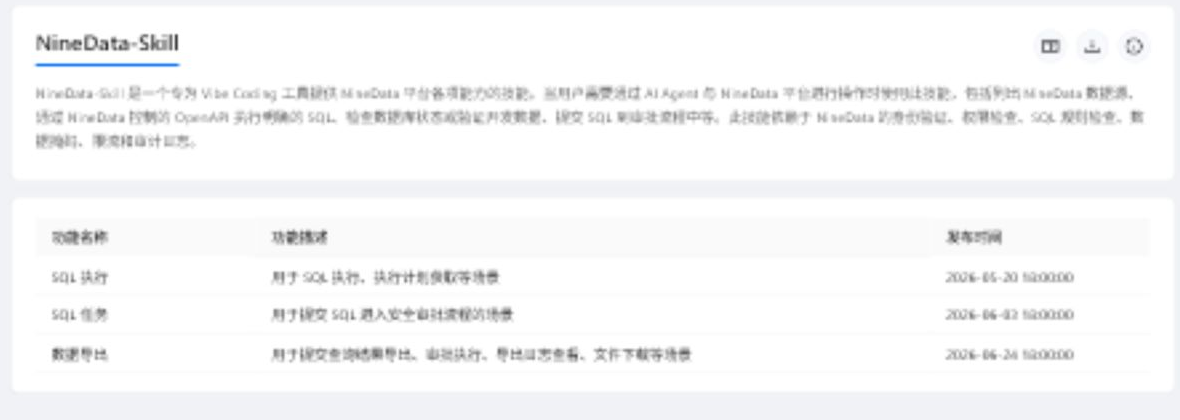
Sign in to the NineData console. In the left sidebar, click Skill. The page displays the NineData-Skill description, download entry, and current capabilities.
Click the description icon beside the download icon. Review the supported capabilities and usage boundaries. The guide maps read-only SQL, change SQL, and data export to their corresponding Skill capabilities and identifies sensitive actions that require explicit authorization.
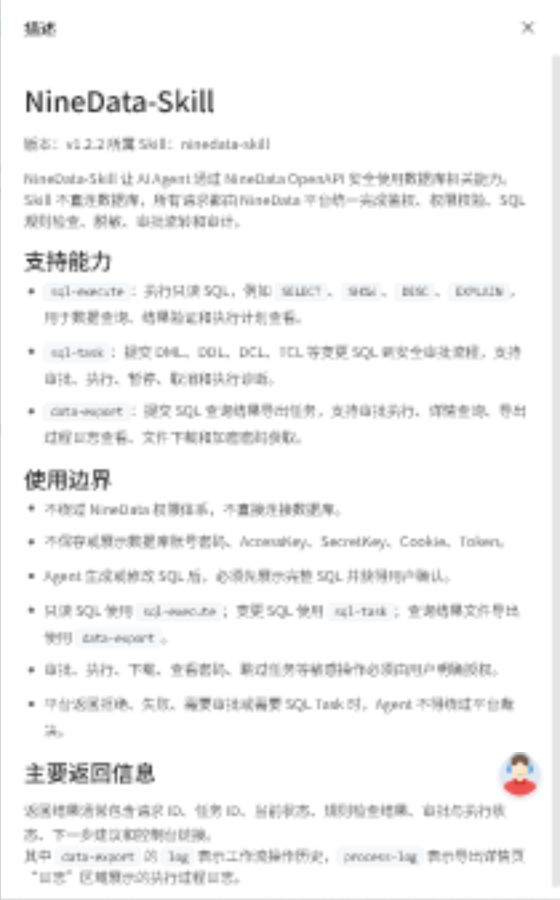
Click the download icon to get
ninedata-skill.zip. Follow the page guidance to install the Skill in the target AI Agent or vibe-coding client. Store the NineData endpoint and OpenAPI credentials in the client's secure local configuration. Keep credentials out of conversations, screenshots, and project code.Ask the Agent to list the data sources visible to the current credential, then select a MySQL data source whose name clearly identifies it as a test environment. This demonstration discovered 17 accessible data sources and kept every subsequent request inside an isolated test database.
Demo 1: Execute Read-Only SQL
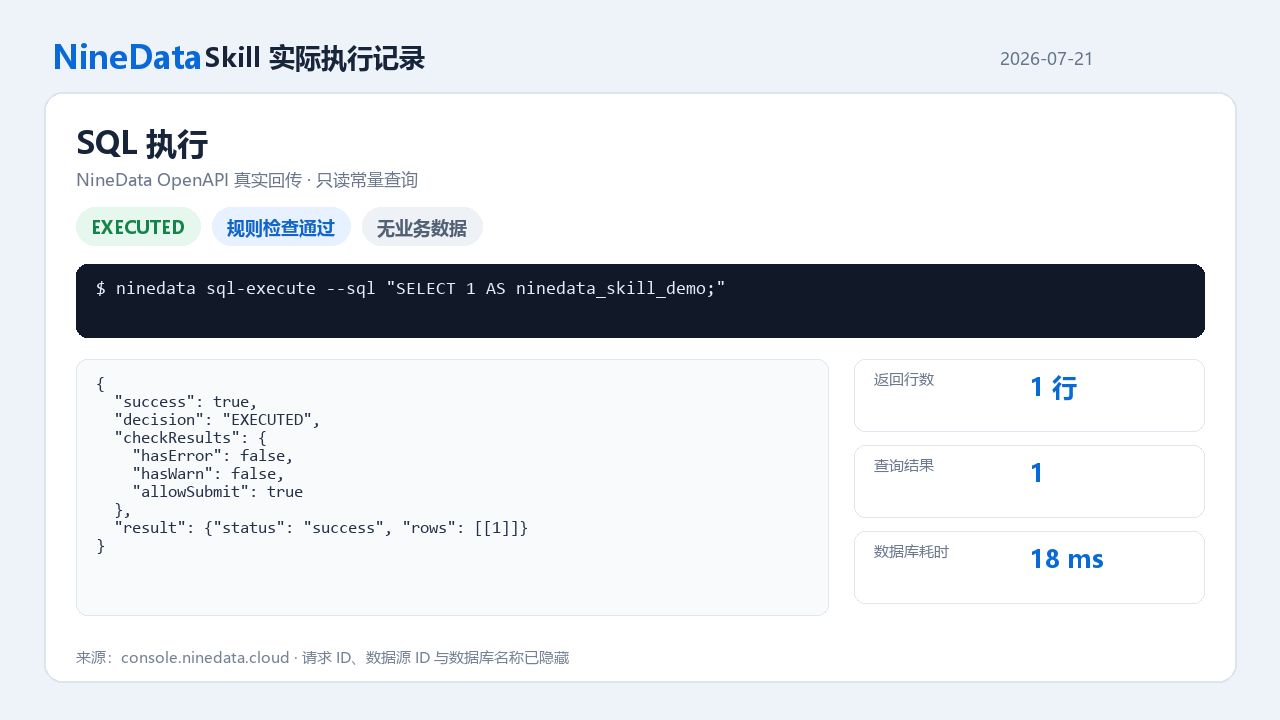
After the user confirms the complete statement, the Agent submits this constant query through SQL Execution:
SELECT 1 AS ninedata_skill_demo;
NineData returned EXECUTED. The rule check reported zero errors and zero warnings. The query returned one row with the value 1, and the database elapsed time was 18 ms. These fields show that the request reached the real data source and completed successfully.
Demo 2: Submit, Approve, and Execute a SQL Task
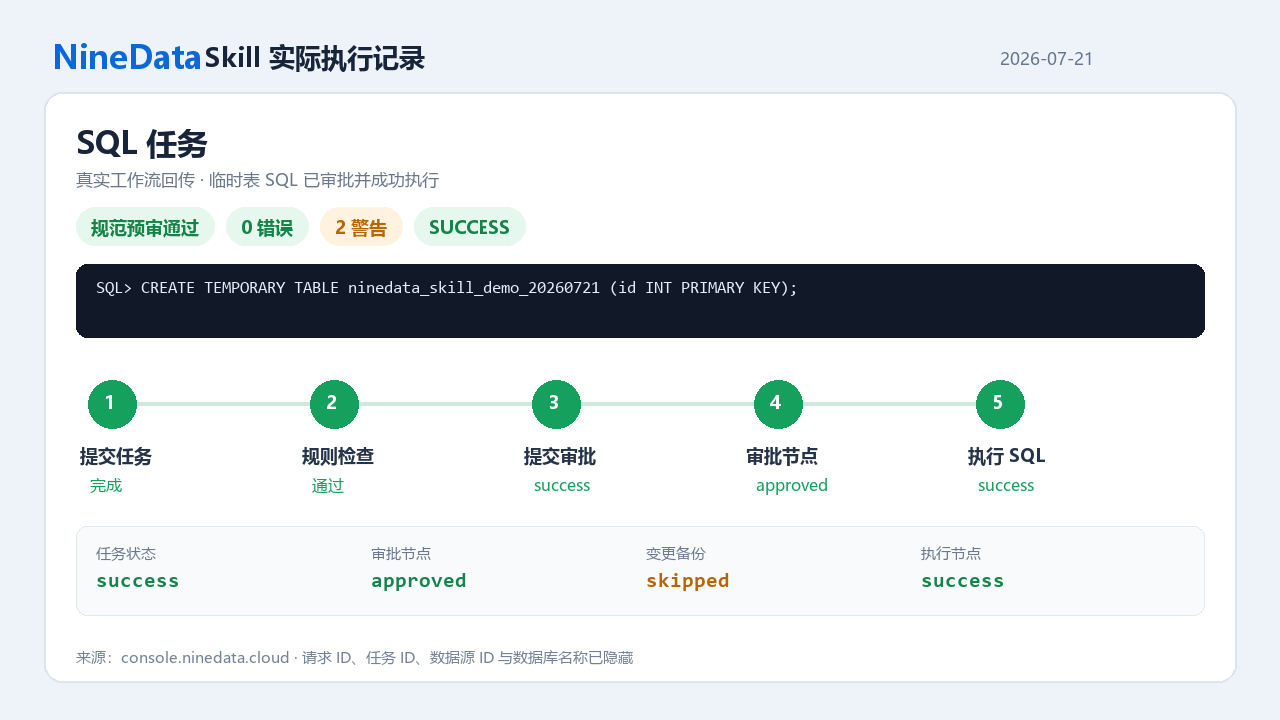
The Agent then sends the confirmed temporary-table statement through SQL Task:
CREATE TEMPORARY TABLE ninedata_skill_demo_20260721 (
  id INT PRIMARY KEY
);
The platform completed its rule review with zero errors and two warnings. The Agent submitted the workflow and it entered one approval node. After the user explicitly approved this task and authorized execution, the node changed to approved and canExecute=true. The Agent started execution immediately. Both the task and its execution node finished with success. The backup node was skipped because change backup does not support temporary-table syntax, with no effect on task execution.
Demo 3: Execute a Data Export
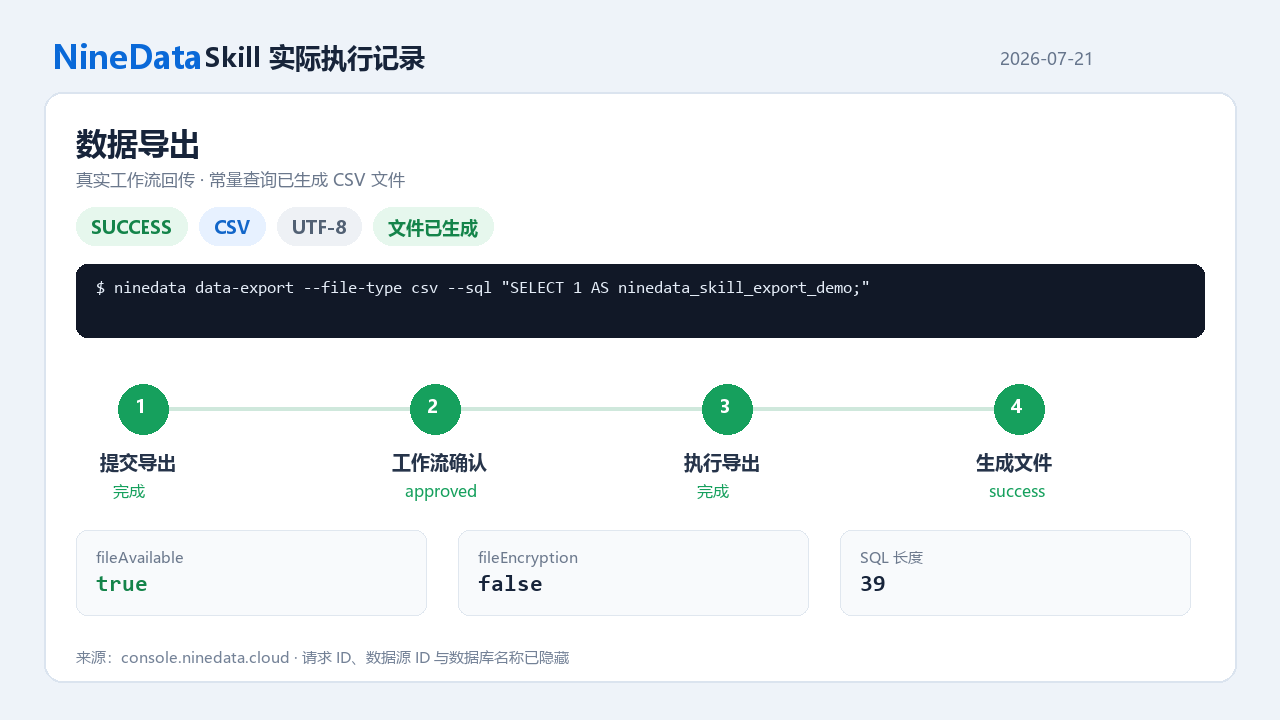
Finally, the Agent submitted a constant query through Data Export and selected CSV with UTF-8:
SELECT 1 AS ninedata_skill_export_demo;
The workflow completed confirmation and execution. Its final status was success with fileAvailable=true. NineData generated an unencrypted CSV file. The demonstration did not request a download link or read the file contents, preserving the boundaries around the export lifecycle and sensitive operations.
The three live operations follow one consistent path. Low-risk queries run after permission and rule checks. Change SQL enters the SQL Task approval workflow. Query results that need a file enter Data Export. The Agent interprets intent, prepares parameters, and follows status updates, while NineData controls identity, permissions, rules, approval, execution, and audit records.
Start with a Safe Instruction
To begin, sign in to the NineData console, open Skill from the left sidebar, download ninedata-skill.zip, and follow the quick setup guide to install the Skill in the target client. Configure the NineData endpoint and OpenAPI credentials locally.
After installation, first ask the Agent to list the data sources visible to the current credential. Then run a narrowly scoped, read-only query. Once the endpoint, credential, and permission settings are confirmed, expand gradually to execution-plan analysis and SQL task workflows.
AI Agents are moving from recommendations to execution. As they get closer to real data and production environments, identity, permissions, rules, approval, and audit become more important.
NineData Skill creates a governed path between Agents and databases. It gives AI executable capabilities while keeping each operation within enterprise database controls.
For configuration and usage details, see NineData Skill.