NineData Documentation
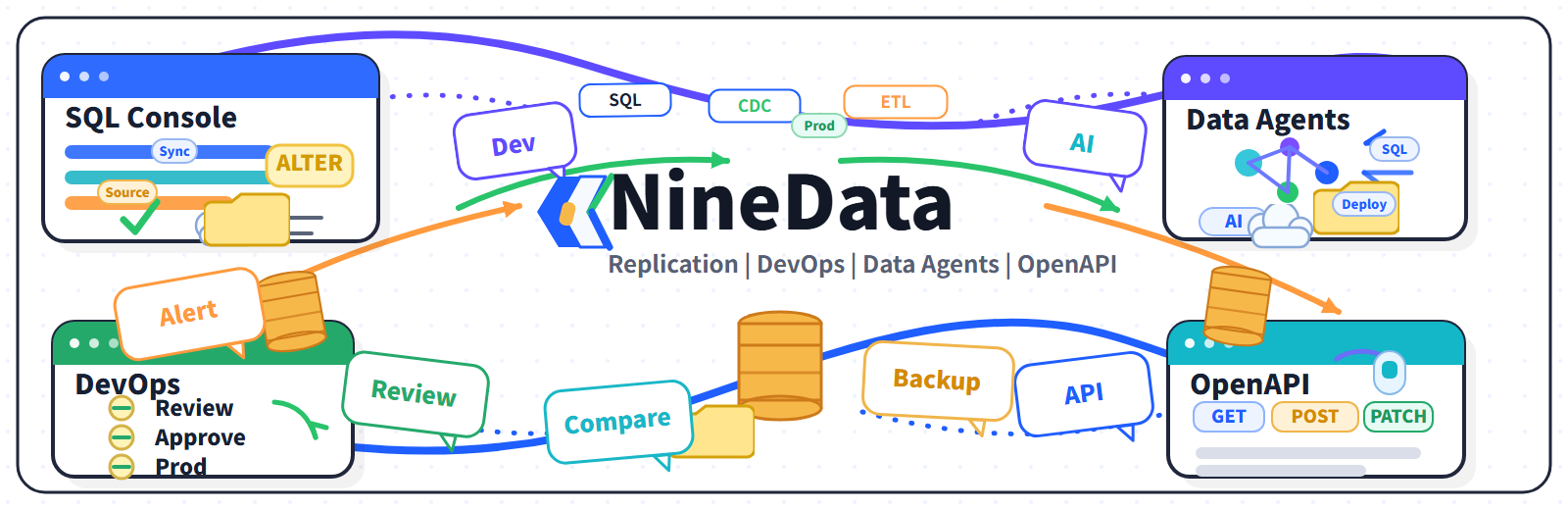
NineData helps teams operate data across cloud and self-managed environments. Use it to prepare data sources, move data safely, manage SQL workflows, ask questions with Data Agents, protect data with backup and restore, compare consistency, and automate routine tasks through OpenAPI.
This site is organized around the way technical teams actually work: pick the product area, open the task guide, then jump to reference pages for settings, limits, and detailed behavior.
Choose a starting point
Data replicationMigrate databases, sync data in real time, and build resilient replication links.Database DevOpsQuery, review, change, and govern SQL workflows from one console.Data AgentsUse ChatDBA, Text2SQL, optimization, diagnosis, and AI configuration features.OpenAPIAutomate common NineData workflows through APIs.
Feature map
| Area | What it covers | Start here |
|---|---|---|
| Data Replication | Full copy, incremental sync, source-based replication guides, and migration assessment | Data replication overview |
| Database DevOps | SQL Console, SQL review, change tracking, data generation, and related workflows | Database DevOps overview |
| Data Agents | ChatDBA, Text2SQL, SQL optimization, SQL diagnosis, knowledge base, and model management | Data Agents overview |
| Backup and Restore | Backup plans, restore workflows, and recovery operations | Backup and restore overview |
| Data Comparison | Compare tables and schemas after changes or migration | Data comparison overview |
| OpenAPI | Scriptable access to core NineData workflows | OpenAPI overview |
How the docs are organized
| Section | Best for |
|---|---|
| Get started | Prepare an account, understand the product areas, and complete a first workflow. |
| Guides | Follow end-to-end guidance for replication, DevOps, Data Agents, backup, restore, and comparison. |
| Develop | Integrate NineData with internal tools or automation scripts. |
| Reference | Configure data sources, accounts, permissions, alerts, billing, deployment, and system settings. |
| Resources | Explore use cases, comparisons, and best practices for database operations. |
Why NineData
| Need | NineData gives you |
|---|---|
| Fewer point tools | Replication, SQL work, AI assistance, and automation in one product. |
| Less manual work | Task-driven workflows instead of scattered scripts and ad hoc operations. |
| Faster onboarding | Clear starting points for teams moving from overview to execution. |
| Better governance | Shared workflows for permissions, audit, review, and repeatable operations. |
Before you start
Most workflows require at least one data source, network access to that source, and the right account permissions. If this is your first setup, begin with the quickstart guide, then open the product area that matches your task.